

Save from Instagram

The recipe you saved, actually cookable.

Everyone has a folder of saved food posts they never cook from. Share one to Mini Chef and it comes back as a recipe with a real ingredient list and real steps.

Download Mini Chef Planner on the App StoreGet Mini Chef Planner on Google Play
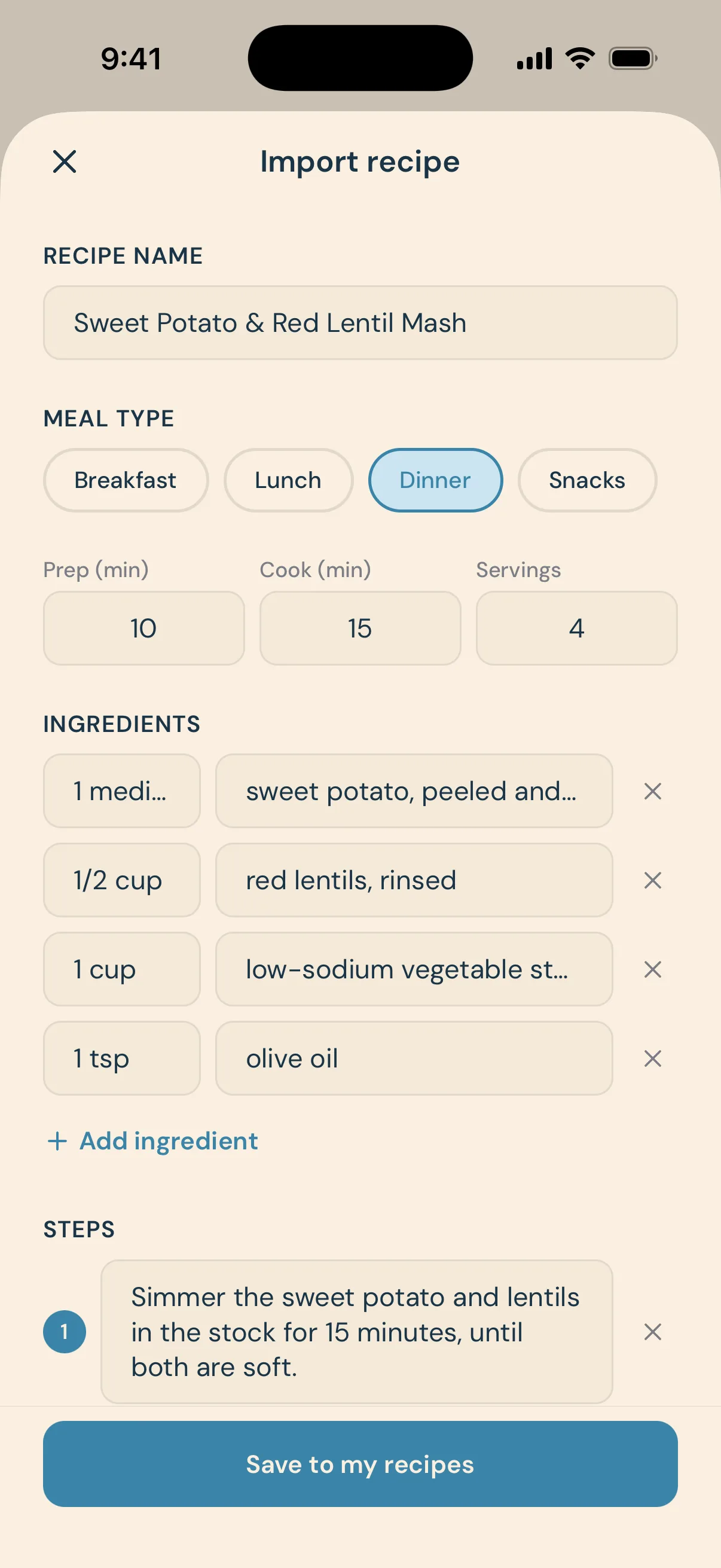
What comes back, laid out for you to check before it saves.

Two ways in, both about ten seconds

Paste an Instagram link into the app, or open the post in Instagram, tap share, and choose Mini Chef. Either way the caption and video get read and turned into a structured recipe. Reels and regular posts both work.

It reads the caption, so you do not have to

Ingredients come out as a list with quantities. Method comes out as numbered steps. What you get back is the same shape as every other recipe in the app, which means it works with Cook mode and its timers rather than being a screenshot you squint at.

You check it before it saves

Caption parsing is not magic, and some creators put the method in the comments or send it by DM. The import always lands in a review screen first, with whatever was found already filled in, so you can correct or complete it before saving. Nothing is saved behind your back.

Saved for good, not lost in a folder

Imported recipes live alongside the curated library in your own collection, searchable and filterable with everything else. The credit stays attached, so you can find your way back to the account that posted it.

Common questions

Give your child the best start.

Download Mini Chef Planner free and have this week’s plan ready tonight.

Download Mini Chef Planner on the App StoreGet Mini Chef Planner on Google Play